Buyer discovery
How to Find Owners of Multi-Location Dental Groups
Find and verify owners of multi-location dental groups, identify the right buyer, and automate relevant outreach without relying on one job title.
By Vaishnav Gupta12 min read
On this page
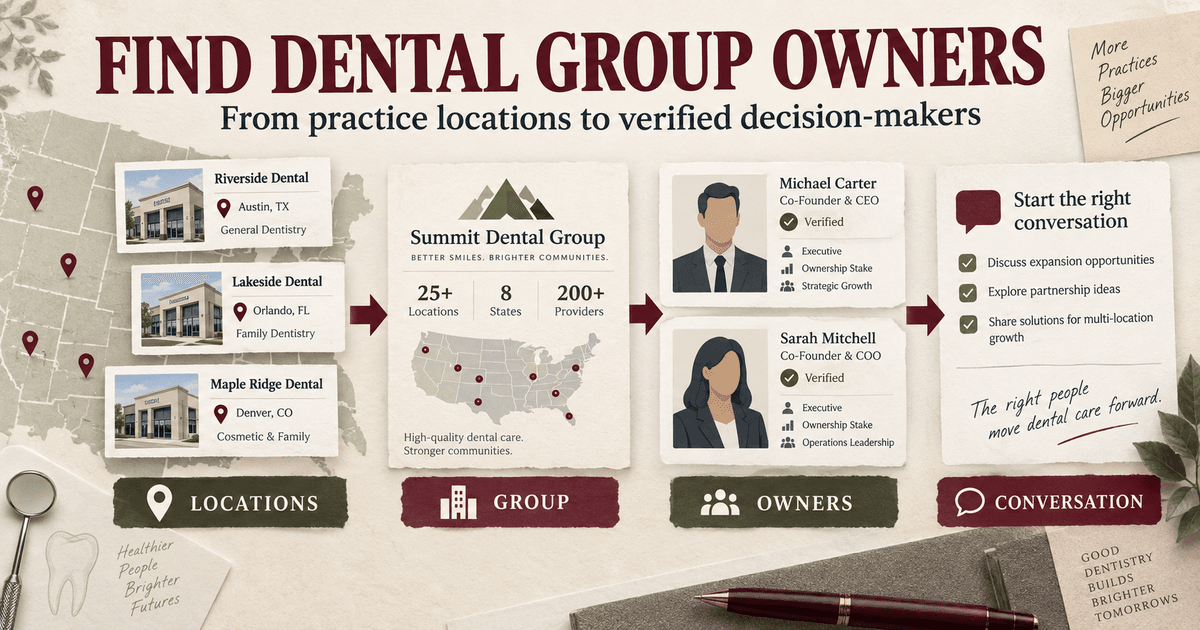
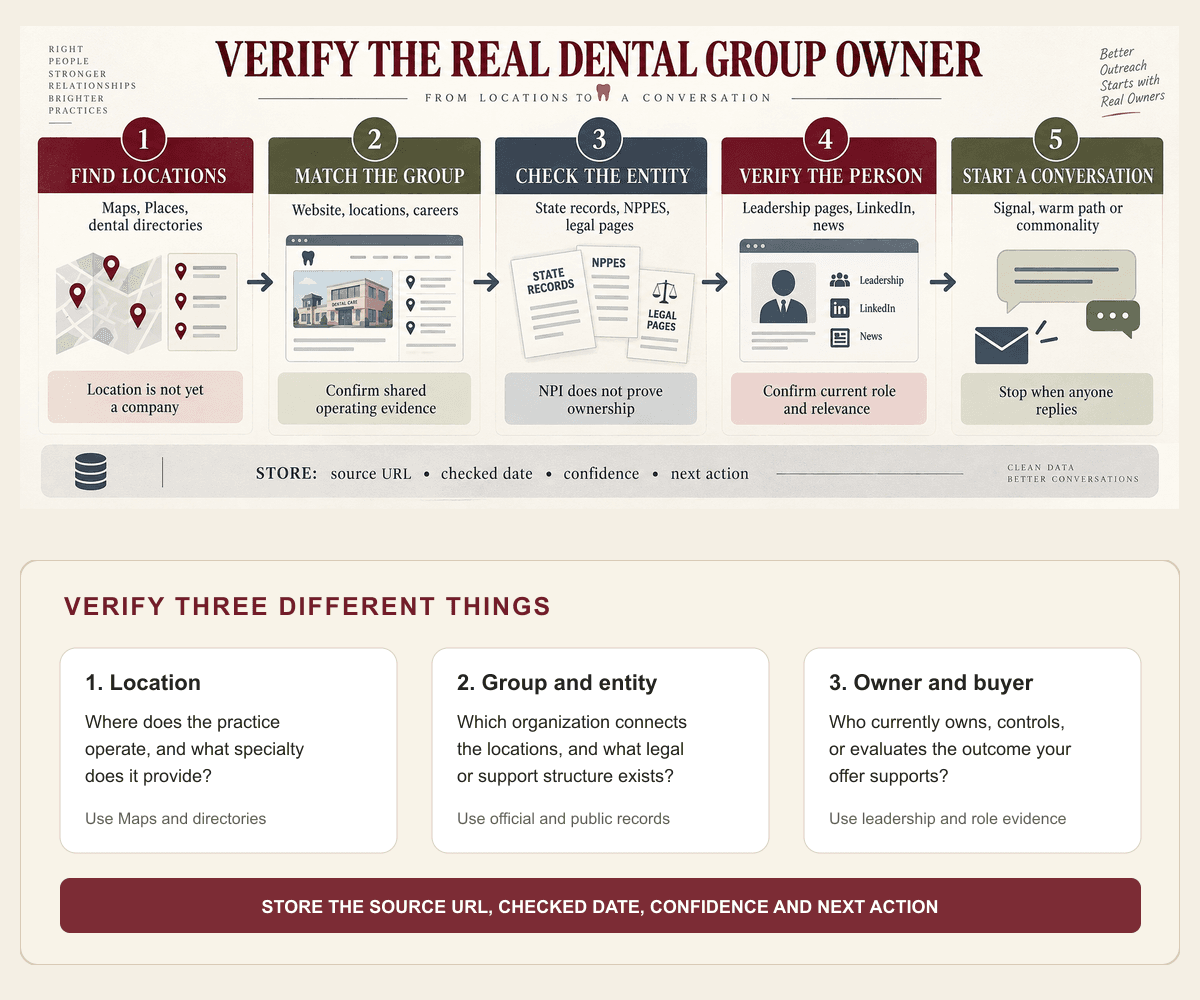
Quick answer: Start with dental locations in your target market, group locations that share a brand or website, identify the legal and operating entities behind each group, and then verify the people who own or control the business. Do not search only for the title "Owner." Depending on the group, the right contact may be a founder, managing partner, CEO, president, or operations leader.
This guide helps B2B providers build an actionable owner database for multi-location dental groups.
What counts as a multi-location dental group?
A multi-location dental group operates two or more practices under shared ownership, management, branding, or support. The locations may use one brand, several local practice names, or separate legal entities.
This distinction matters because a visible brand is not always the owner. The American Dental Association explains that dental support organizations can provide nonclinical business support while ownership models and local practice identities vary (ADA practice-model guidance; ADA DSO overview). A group may also treat locations as separate business entities for some decisions.
Before adding an owner, separate these three records:
| Record | What it represents | Example fields |
|---|---|---|
| Location | One physical dental practice | Practice name, address, phone, specialties |
| Group | The organization connecting locations | Parent brand, website, number of locations, geography |
| Person | A verified owner or relevant decision-maker | Name, role, ownership evidence, contact details |
If those records are mixed together, the same group may appear five times as five unrelated prospects, or one dentist may be incorrectly labeled as the owner of every location.
Who to target at a dental group
Contact the person who can evaluate the offer, not simply the person with the most senior title.
For a dentist-owned regional group, that may be the owner-dentist, founder, managing partner, or president. For a larger group supported by a DSO or management company, it may be the CEO, COO, VP of Operations, procurement leader, or functional executive responsible for the problem you solve.
Use the offer to select the buying role:
| Your offer | Likely first contact | Other stakeholders to map |
|---|---|---|
| Practice management software | COO or operations leader | Owner, IT leader, practice administrator |
| Accounting or fractional finance | Owner or CEO | Controller, VP Finance, managing partner |
| Dental supplies or equipment | Operations or procurement leader | Clinical director, owner, regional manager |
| Recruiting or staffing | Operations or people leader | Owner, clinical director, regional manager |
| Marketing services | Owner, CEO, or marketing leader | Operations leader, location partner |
| IT and cybersecurity | IT leader or COO | Owner, compliance leader, operations leader |
When ownership or buying authority is unclear, map two to four stakeholders. Start with the role closest to the problem and stop coordinated outreach when one person responds.
Which lead sources can help you find dental group owners?
Use several public sources because no single source proves the full relationship between a location, group, and owner.
1. Google Maps and dental directories
Search by geography using terms such as "dentist," "dental clinic," "orthodontist," or "oral surgeon." Google Places supports dentist and dental_clinic as place types, which can help with structured location discovery.
Capture the practice name, address, website, phone number, review count, and category. Then look for repeated domains, shared phone systems, common branding, and "Our locations" pages. These clues can reveal that several listings belong to one group.
Maps helps discover locations. It does not prove ownership.
2. The dental group's website
The website is often the best source for understanding the group. Check:
- About, leadership, and team pages
- Location pages and footer entities
- Careers pages and job descriptions
- Privacy policies and terms pages
- Acquisition, partnership, and expansion announcements
Record the exact page that supports each claim. A founder biography can support a founder relationship. A location page can support group affiliation. Neither automatically proves current economic ownership.
3. NPPES and the NPI Registry
Use the National Provider Identifier records to check provider and organization names, taxonomies, and practice locations. CMS publishes downloadable NPPES files with additional practice locations.
Treat NPI data as identity and location evidence, not ownership proof. CMS explicitly notes that an NPI does not validate licensing or credentials. It also does not establish who owns the business.
4. State business and dental records
Search the relevant secretary of state business registry for the practice entity, assumed name, registered agent, and filing history. Depending on the state, dental board or facility records may add useful context.
Ownership and disclosure rules differ by state. Save the source and date instead of turning a registry clue into a stronger claim than the record supports.
5. LinkedIn
Search the verified group and related entities for current titles such as founder, owner, partner, president, CEO, COO, or practice administrator. LinkedIn Sales Navigator supports company, title, function, seniority, geography, relationship, and shared-experience filters.
Use profile history to confirm that the person is still connected to the group. Then check mutual connections or shared professional commonality. A warm path is useful when it is genuine. If no warm path exists, use relevant common ground or a direct, evidence-based message.
What belongs in a dental group owner lead database?
A usable database should answer four questions: Is this a real multi-location group? Who appears to own or control it? Is the person relevant to the offer? Why is now a reasonable time to contact them?
| Field | Why it matters |
|---|---|
| Group name and official domain | Creates one account record |
| Location count and service area | Confirms multi-location fit |
| Practice names and addresses | Prevents duplicate or missing locations |
| Specialties | Helps match the offer to the group |
| Parent, DSO, or management relationship | Separates brand from operating structure |
| Person name and current role | Identifies the stakeholder |
| Ownership or authority evidence URL | Supports the classification |
| Work email and LinkedIn URL | Enables coordinated outreach |
| Relevant business signal | Provides timing and context |
| Warm path or verified commonality | Selects the conversation route |
| Source dates | Shows when the evidence was checked |
| Next action and stop rule | Prevents conflicting messages |
Do not mark a person as verified_owner because their profile says "Dentist" or because their name appears in a practice name. Use separate values such as verified_owner, founder_unconfirmed_current_ownership, executive_buyer, and location_level_contact.
Which signals make outreach more relevant?
Prioritize changes connected to your offer:
- A new location, acquisition, or market entry
- Hiring across several practices or functions
- A new functional leader
- A rebrand, new specialty, or technology project
- Leadership content about operational priorities
Match each event to a plausible outcome your offer supports. The limitations section below explains how to use these signals responsibly.
Best tools to automate outreach
FindOnline
What it does: FindOnline's medical and dental GTM workflow can coordinate account discovery, entity matching, decision-maker research, qualification, personalized outreach, reply handling, and continued engagement across LinkedIn, Reddit, email, and public-web signals. Its complete GTM workflow connects those stages in one system.
Strengths: It connects verified research, multichannel conversations, and ongoing engagement. Human review is optional by stage.
Best for: Teams that want one managed workflow from dental group discovery through relationship development.
Limitations: FindOnline is designed as a complete GTM system. A team that only wants a one-time enrichment file or one isolated signal feed should discuss a component-specific plan.
Google Maps and Places
What it does: Discovers dental practices by category and geography and provides location-level details.
Strengths: Broad local discovery with address, domain, category, and review information.
Best for: Building the first location universe for a city, state, or region.
Limitations: A place listing does not identify the parent group or owner. Entity resolution is still required.
NPPES and NPI Registry
What it does: Supplies public provider and organization identity, taxonomy, and location data.
Strengths: Official healthcare identifiers and practice-location evidence.
Best for: Verifying healthcare entities and discovering related practice locations.
Limitations: An NPI is not proof of ownership, licensing, or buying authority.
LinkedIn Sales Navigator
What it does: Filters people and companies by current role, seniority, geography, relationship, and shared experience.
Strengths: Current professional context, role history, and possible relationship paths.
Best for: Checking current professional roles and finding a credible path to a person.
Limitations: Users must still connect profiles to the correct legal and operating entities and manage the broader workflow.
Apollo
What it does: Apollo provides B2B contact data, filters, enrichment, and email sequencing.
Strengths: Repeatable email follow-up after the account and buyer are verified.
Best for: Teams that already know the target accounts and need contacts plus repeatable email execution.
Limitations: Local dental group coverage and entity relationships should be independently checked.
Clay
What it does: Clay lets teams combine multiple data providers, web research steps, enrichment logic, and outbound actions.
Strengths: Flexible custom research and enrichment logic for technical RevOps teams.
Best for: RevOps teams that want to design and maintain a custom workflow.
Limitations: Quality depends on the chosen providers, matching rules, prompts, and ongoing workflow maintenance.
Tool comparison
| Tool | Best for | Data and discovery | Outreach automation | Integrations | Support and review | Limitations |
|---|---|---|---|---|---|---|
| FindOnline | Complete research-to-relationship execution | Dental, LinkedIn, Reddit, and public-web signals | Automated LinkedIn, Reddit, and email activity plus reply handling | Coordinated GTM workflow | Automatic execution with optional review by stage | Designed as a complete system rather than a one-time export |
| Google Maps and Places | Finding dental locations | Local listings, domains, categories, and reviews | None | Places API and map products | Team verifies group relationships | Does not identify owners |
| NPPES | Checking healthcare entities | Provider, organization, taxonomy, and location records | None | Public registry, API, and data files | Team interprets entity relationships | Does not prove ownership or authority |
| LinkedIn Sales Navigator | Verifying roles and paths | Company, title, seniority, relationship, and activity filters | LinkedIn prospecting and InMail features | CRM capabilities vary by edition | User verifies evidence and controls outreach | Does not resolve every dental group entity |
| Apollo | Running a prepared email motion | Contact and company database | Automated email plus manual social and call tasks | Mailbox and sales integrations | Team owns qualification and messaging | Requires a verified group-to-person map |
| Clay | Building a custom data workflow | Connected providers and web research | Configurable through workflows and integrations | Broad provider ecosystem | Team builds and maintains the logic | Output depends on sources and matching rules |
What is the outreach workflow from search to reply?
Use one evidence-backed reason for contacting the account and connect it to one outcome your offer supports.
Example:
Hi Maya, I saw BrightSmiles added two locations in North Texas and is recruiting practice managers across the group. We help regional dental operators standardize onboarding across new locations. If that is part of your current expansion work, I can send the three-stage checklist we use with multi-site teams.
The message works only if the expansion and role are current. Do not claim the group has a problem. Do not invent familiarity.
If a trusted connection knows the owner well, ask whether the topic is relevant before requesting an introduction. If there is no warm path, use verified common ground such as specialty focus, geography, professional association, education, or a recent public post. If there is no honest connection point, use a concise direct message based on the business signal.
After the first message, coordinate follow-ups across stakeholders and channels. Stop the sequence when anyone replies. Continue useful engagement only when it adds context, such as responding to a relevant post or sharing a resource related to the group's stated priority.
Which industry-specific nuances matter for dental groups?
A dental brand can include dentist-owned practices, separate location entities, and a business support organization. Keep clinical ownership, operating control, and buying authority as separate fields. A founder may approve a strategic partnership while operations, procurement, IT, finance, or clinical leadership evaluates the actual service.
Specialty also changes the account context. Orthodontic, pediatric, oral-surgery, and general-dentistry groups have different staffing, equipment, referral, and operating priorities. Use the specialty to choose relevant evidence and stakeholders, not to invent a need.
Limitations: what public signals can and cannot prove
Signals are directional. A new location, job post, acquisition, or leadership change may be outdated or unrelated to an active buying project. Use signals to prioritize accounts and personalize outreach and follow-ups, not to claim confirmed need, budget, or dissatisfaction.
Rescan active accounts regularly because ownership, roles, priorities, and locations change. Replace stale evidence instead of repeating an old claim. For commercial email, the sender remains responsible for applicable requirements, including the FTC's CAN-SPAM guidance.
Frequently asked questions
What is the fastest way to find owners of multi-location dental groups?
Find practices by geography, group locations by shared website or brand, verify the group on its official site, then check ownership and leadership through state records and current professional profiles. Store the evidence for every match.
Can I find the owner using only Google Maps?
No. Google Maps can identify locations, categories, websites, and contact surfaces. It does not reliably establish the parent entity or current owner.
Does an NPI record show who owns a dental group?
No. NPPES is useful for provider and organization identity, taxonomy, and practice-location data. It should not be treated as proof of economic ownership or purchasing authority.
Should I contact only the dental group owner?
No. Contact the stakeholder closest to your offer. In a larger group, an operations, clinical, finance, IT, marketing, or procurement leader may evaluate the service before the owner approves it.
How many contacts should I identify per dental group?
Usually two to four. Include the likely decision owner, the functional buyer, and one operational stakeholder. Coordinate the sequence and stop it as soon as someone responds.
Can the research and outreach run automatically?
Yes. Discovery, matching, qualification, personalization, sequencing, reply handling, and ongoing engagement can be automated. The workflow still needs explicit evidence rules, freshness checks, stop conditions, and compliant messaging.
Sources
- Practicing Dentistry — American Dental Association · Accessed
- What are the main types of DSOs? — American Dental Association · Accessed
- NPPES NPI downloadable files — Centers for Medicare and Medicaid Services · Accessed
- Google Places supported place types — Google for Developers · Accessed
- Sales Navigator advanced search filters — LinkedIn · Accessed
- Sequences overview — Apollo · Accessed
- Common Clay use cases — Clay · Accessed
- FindOnline for medical and dental — FindOnline · Accessed
- How FindOnline works — FindOnline · Accessed
- CAN-SPAM Act: A Compliance Guide for Business — Federal Trade Commission · Accessed