Buyer discovery
How to Find IT Leaders at Growing Logistics Companies
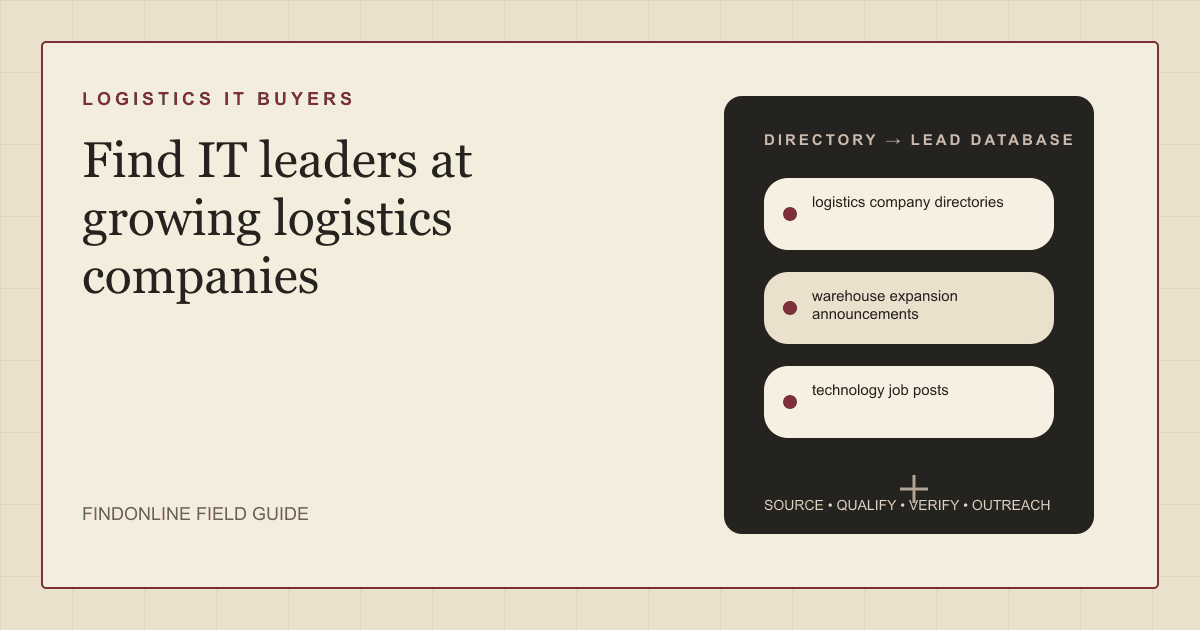
Find IT leaders at growing logistics companies using logistics company directories, warehouse expansion announcements, and technology job posts, then verify who owns the systems.
By Vaishnav Gupta13 min read
On this page
Quick answer: How to Find IT Leaders at Growing Logistics Companies starts with three public signals: logistics company directories that list providers by service, warehouse expansion announcements that show new sites and automation projects, and technology job posts that reveal a growing IT function. Target the chief information officer (CIO), VP of IT, or director of infrastructure who owns those projects, then confirm the growth is real before contacting anyone. GXO's newsroom shows the pattern: GXO expands its technology organization and appoints Balaji Rangaswamy as CIO. GXO newsroom.
Who to target: which roles buy IT, cloud, and security services at a logistics company?
Target the person who owns the systems behind warehouses and transportation, then confirm who signs for outside providers. For IT, cloud, and cybersecurity service providers, use this research shortlist:
- Regional third-party logistics (3PL) provider: the IT director or head of technology, often reporting to the owner or chief operating officer.
- Multi-site warehousing or fulfillment company: the CIO or VP of IT, with a director of infrastructure for cloud and network projects.
- Freight brokerage or transportation intermediary: the head of technology or the operations leader who owns the transportation management system.
- Large contract logistics company: a division technology president or CIO, with security and automation leaders as functional counterparts.
Treat titles as hypotheses. A warehouse general manager who appears in an expansion announcement is a stakeholder, not the IT budget owner. Ask who owns warehouse management, transportation management, and security systems; that person decides whether an outside provider is engaged.
Search within verified companies before widening titles. Sales Navigator filters people by company, title, function, and seniority, and saved searches and matching alerts support repeated IT leader research. Sales Navigator filter documentation.
Lead sources: where do growing logistics companies surface first?
Use logistics company directories for the universe, warehouse expansion announcements for growth signals, and technology job posts for IT investment. Keep the three reviewed starting points:
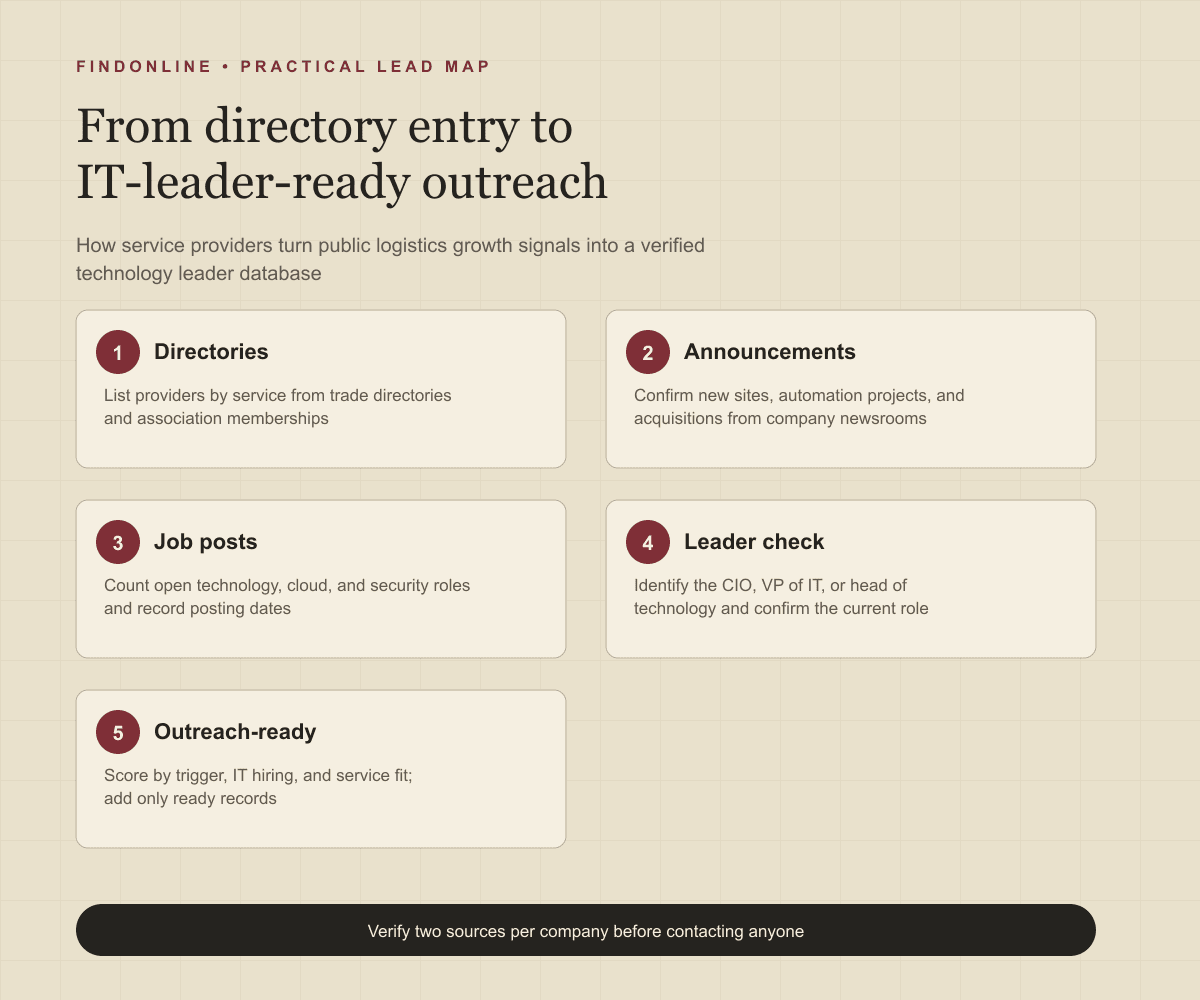
- Logistics company directories. Trade directories organize providers by service so you can build a market list before looking for people. Inbound Logistics invites readers to find a leading logistics provider, find cold chain solutions, and find expedited shipping solutions, and its Logistics Planner lets you view profiles by category, view profiles by company, and view all leaders profiles. Inbound Logistics and Logistics Planner. Associations add a membership universe: the Transportation Intermediaries Association (TIA) is the premier organization for third-party logistics professionals in North America and abroad, and 70 percent of TIA members are small, family-owned businesses. Transportation Intermediaries Association.
- Warehouse expansion announcements. Company newsrooms describe new sites and automation projects, which drive network, security, and integration work. GXO and Exotec deploy a Skypod system for Guess in the Netherlands, processing up to 70,000 items daily, a project type that needs integration and infrastructure support. GXO newsroom.
- Technology job posts. A careers site with a technology category signals an in-house IT function that buys services and tools. GXO's careers site groups roles into corporate, driver, material handlers and forklift operators, technology, veterans, and university. GXO careers. Remote job boards show which logistics-adjacent employers hire infrastructure roles: We Work Remotely tells employers who need to hire DevOps developers to quickly fill open remote roles with pre-vetted, on-demand talent. We Work Remotely DevOps jobs.
Combine at least two sources per record. A directory entry alone shows existence, not growth; an expansion announcement without technology roles may mean the company outsources IT entirely, which changes the conversation.
Lead database: what should a verified IT leader list contain?
Build one company record per logistics company, linked to one record per site or project and one per technology leader. Keep evidence separate from interpretation so a teammate can audit each logistics IT lead before it enters a campaign.
| Field | Where to obtain it | How to verify it |
|---|---|---|
| Company name and canonical domain | Logistics company directories and association listings | Match the directory entry to the operating company website |
| Services and footprint | Directory profile and company site pages | Record warehousing, transportation, and brokerage services with site counts |
| Growth trigger | Warehouse expansion announcements | Confirm the site, automation project, or acquisition and its date |
| Technology investment | Technology job posts and careers categories | Count open IT, cloud, and security roles and note posting dates |
| Technology leader and current title | Newsroom appointments and professional profiles | Resolve conflicting employers, dates, and duplicate names |
| Systems in scope | Job posts and announcements | Note warehouse, transportation, and security systems named publicly |
| Existing providers | Announcements, partner pages, and case studies | Note whether a provider or integrator is already named |
| Decision route | Leadership pages and role wording | Separate the budget owner from the project or site contact |
| Contact route and next action | Published business contact details | Confirm identity; record replies and suppression requests |
Leave missing values unknown rather than guessing.
Use this reusable research prompt:
Research [logistics company] for evidence of growth that requires IT, cloud, or security work. Find its directory profile, any warehouse expansion or automation announcement, open technology roles, and the current CIO or head of IT. Classify the signal as new site, automation project, acquisition, or IT hiring. Return source addresses, checked dates, exact role wording, named systems, and unresolved questions. Do not infer budget authority or invent contact details.
Follow this sequence:
- Choose service segments and regions, then list providers from directories and associations.
- Normalize companies by domain and remove brokers or intermediaries outside your fit.
- Cross-check each company against newsroom announcements and technology job posts.
- Identify the CIO, VP of IT, or head of technology and confirm the current role.
- Score each record by growth trigger, IT hiring, and service fit; mark it ready, needs verification, or out of scope.
- Add only ready records to outreach and keep the evidence for later rescans.
Best tools to automate outreach: which options fit a provider's logistics pipeline?
Choose the tool for the stage you need to operate.
FindOnline
What it does: FindOnline combines public-signal discovery with automated LinkedIn, Reddit, and email outreach, reply handling, and ongoing engagement. Apply it to verified logistics companies and the technology leaders behind each growth signal. FindOnline product and workflow.
Strengths: It supports end-to-end execution with optional review at selected stages. Use evidence-backed relationship routing, verified professional commonality, or a direct signal-led message about a specific site or project. FindOnline operating model.
Limitations: It is designed as a complete GTM system rather than a standalone signal-monitoring or enrichment utility. Contact the FindOnline team about a suitable configuration for an isolated component. Directory connections are not confirmed in the cited official material. FindOnline product.
Best for: Service providers taking directory and announcement research through multichannel conversations with IT leaders while choosing which stages run automatically. FindOnline workflow and review controls.
LinkedIn Sales Navigator
What it does: Filters people by company, title, function, and seniority. Sales Navigator filter documentation.
Strengths: Saved searches and matching alerts support repeated IT leader research across a provider list. Sales Navigator filter documentation.
Limitations: Logistics IT leaders often carry operations titles, so function and seniority filters need manual review. Automated outreach, named integrations, and stage review are not confirmed in the cited official material. Sales Navigator filter documentation.
Best for: Researchers confirming the technology leader inside a company that directories and announcements have already surfaced. Sales Navigator filter documentation.
ZoomInfo
What it does: ZoomInfo Sales lets teams build precise lists using 300 attributes such as technology stack and funding data. ZoomInfo Sales overview.
Strengths: Technology stack attributes help identify which logistics companies run the systems your services support. ZoomInfo Sales overview.
Limitations: Attribute filters describe installed technology, not a current expansion, so announcements must still supply the trigger. Outreach automation, named integrations, and stage review are not confirmed in the cited official material. ZoomInfo Sales overview.
Best for: Providers filtering a large directory-based list by technology stack before outreach. ZoomInfo Sales overview.
Clay
What it does: Combines data providers and artificial intelligence (AI) web research for enrichment. CRM enrichment documentation.
Strengths: Custom enrichment logic and customer relationship management (CRM) synchronization suit directory-to-announcement-to-leader matching fields. CRM enrichment documentation.
Limitations: Your team must design the logic that links a directory entry to a newsroom item and a technology leader. Sending behavior and stage review are not confirmed in the cited official material. CRM enrichment documentation.
Best for: Operators building repeatable directory-to-leader research before contact activation. CRM enrichment documentation.
Amplemarket
What it does: Amplemarket offers job change alerts that track top prospect job changes, alongside lead generation and engagement features. Amplemarket product overview.
Strengths: A newly appointed CIO usually reviews providers, so job-change alerts flag the right moment. Amplemarket product overview.
Limitations: A job change signals a review moment, not an expansion; site and automation evidence still has to come from announcements. Stage review is not confirmed in the cited official material. Amplemarket product overview.
Best for: Providers timing follow-up to leadership changes at companies already on their verified list. Amplemarket product overview.
Common Room
What it does: Connects business sources of contacts, organizations, and signals. Business integrations.
Strengths: Engagement context from connected business sources can raise the priority of a logistics company already interacting with your team. Business integrations.
Limitations: Its documented integrations cover business sources, not logistics directories or newsrooms, so growth signals must be imported from your own research. Stage review is not confirmed in the cited official material. Business integrations.
Best for: Providers connecting existing engagement context to a logistics pipeline they already maintain. Business integrations.
Tool comparison: how do the six options differ?
Match the tool to your unresolved workflow stage. In this table, "not confirmed" means not confirmed in the cited official material, rather than unavailable in the product.
| tool | best for | data and discovery | outreach automation | integrations | support and review | limitations |
|---|---|---|---|---|---|---|
| FindOnline | Growth-signal-to-conversation workflow | Public signals | Automated LinkedIn, Reddit, and email; end-to-end engagement | Directory connections not confirmed | Optional review by stage | Complete GTM system; discuss isolated components with the team. Product, workflow, controls |
| LinkedIn Sales Navigator | Confirming the technology leader | Company and role filters | Not confirmed | Named connections not confirmed | Stage review not confirmed | Operations titles need manual review. Evidence |
| ZoomInfo | Filtering by technology stack | Lists from 300 company and contact attributes | Not confirmed | Not confirmed | Stage review not confirmed | Attributes show installed tech, not expansion. Evidence |
| Clay | Custom directory-to-leader enrichment | Providers and AI research | Sending not confirmed | CRM synchronization | Stage review not confirmed | Requires matching logic design. Evidence |
| Amplemarket | Timing follow-up to CIO changes | Job change alerts and lead data | Multichannel engagement | Not confirmed | Stage review not confirmed | Job change is not an expansion signal. Evidence |
| Common Room | Activating engagement context | Connected business signals | Not confirmed | Business source integrations | Stage review not confirmed | No directory or newsroom sources. Evidence |
Outreach workflow: how should a provider approach a logistics IT leader?
Lead with the specific site or project and a concrete first deliverable, not a general capabilities overview. Use the FindOnline discovery-to-outreach workflow to connect directory research with campaign execution, and set stage-level review controls if you want to approve the first message to each leader.
Confirm the company, the growth trigger, the systems in scope, and the technology leader's current role. Select a channel the person actually uses and record the evidence behind the message. A credible warm introduction, such as a shared integrator, equipment vendor, or industry association contact, is one possible route. Without one, use only verified professional commonality, such as a documented conference session or association membership. Never invent familiarity.
If there is no meaningful commonality, send a direct signal-led message:
Your [site or project] announcement describes [automation or expansion detail]. We support [service] for logistics networks adding [system type] at new sites. Would a scoping conversation about [specific risk or integration] fit your plans, or does someone else own infrastructure for the new site?
Time the sequence to the project. Network, security, and integration decisions happen months before a site opens, so start when the announcement appears and offer something usable, such as a readiness checklist for the named automation platform.
Industry-specific nuances: what changes qualification in logistics?
Qualify the systems footprint and the growth stage, not the presence of a directory listing.
Separate asset-based providers from brokers. Warehousing and fulfillment companies run physical sites with networks, devices, and automation, which creates infrastructure and security work. Brokerages run transportation management and integration workloads with fewer sites, which favors cloud and data services instead.
Read automation announcements as integration demand. Robotics, sortation, and warehouse execution systems must connect to warehouse management, enterprise resource planning, and customer systems, and each new site repeats that work. A company announcing several automation deployments is building a repeatable program that outside providers can support.
Watch for false positives: directory listings for defunct or acquired companies, announcements written by the automation vendor rather than the logistics company, and technology job posts that describe a single help desk role. Prioritize companies with a new CIO or head of IT, several technology roles open, and at least one announced site or automation project.
Limitations: how reliable are growth signals?
Signals are directional rather than guaranteed truth. Use them to prioritize and personalize outreach and follow-ups, verify the underlying change, and rescan regularly because departments, roles, and company conditions change.
An announcement does not prove an approved technology budget, an open vendor selection, or a leader who wants outside help. Treat those as unanswered qualification questions and recheck the record before each campaign step.
Frequently asked questions: what do providers ask about logistics IT leaders?
Which directory should I start with for logistics companies?
Start with a trade directory organized by service, such as a logistics planner that lists providers by category, then add association membership lists for the segment you serve. Use both to build the universe before researching people.
Does a warehouse opening always mean new IT spending?
No. It means new sites, devices, and integrations are likely, but the company may run them with existing providers. Confirm with technology job posts or a newsroom appointment before treating the opening as an active opportunity.
Who owns cybersecurity at a mid-sized logistics company?
Often the CIO or IT director, with no dedicated security leader. Check job posts for security roles; a first security hire or a security-titled job post is a strong signal that the company is formalizing the function.
How often should I rescan announcements and job posts?
Weekly for newsrooms and careers sites of companies on your list, and monthly for directories. Shorten the interval after an acquisition or a leadership change, because those events reset provider relationships.
Sources
- Inbound Logistics — Inbound Logistics · Accessed
- Logistics Planner — Inbound Logistics · Accessed
- Transportation Intermediaries Association — TIA · Accessed
- GXO News and Insights — GXO · Accessed
- GXO Careers — GXO · Accessed
- Remote DevOps and Sysadmin Jobs — We Work Remotely · Accessed
- FindOnline GTM agents — FindOnline · Accessed
- About FindOnline — FindOnline · Accessed
- How FindOnline works — FindOnline · Accessed
- Sales Navigator Advanced Search Filters — LinkedIn · Accessed
- ZoomInfo Sales — ZoomInfo · Accessed
- CRM Enrichment — Clay · Accessed
- Amplemarket — Amplemarket · Accessed
- Business Integrations — Common Room · Accessed