Buyer discovery
How to Find Ecommerce Leaders Managing Multi-State Sales Tax
Find ecommerce tax decision-makers through storefronts, state nexus guidance, and verified roles. Build a qualified merchant list and plan relevant outreach.
By Vaishnav Gupta11 min read
On this page
Quick answer: To find ecommerce leaders managing multi-state sales tax, target founders, controllers, finance directors, and tax leaders at merchants with documented cross-state activity. Start with ecommerce storefronts, state nexus guidance, and LinkedIn company pages. First, build a domain list and record each merchant's channels and locations; treat those observations as research leads, not proof of tax exposure.
Who to target: which ecommerce leaders own the decision?
Start with the person responsible for tax operations, then identify the person who can approve advisory work. Use this working buyer map, and confirm responsibility in conversation:
- Founder or owner: begin here when no dedicated finance leader is visible.
- Controller or finance director: ask about reconciliation, filing coordination, and external adviser selection.
- Head of tax or indirect tax manager: qualify the specific specialist work they would consider outsourcing.
- Ecommerce or operations leader: use as a process contact for storefront changes, fulfillment, and channel ownership.
Do not assume the most senior title owns the project. Search the merchant's exact company identity, then compare current professional profiles with its leadership page. LinkedIn supports current-company, title, function, and seniority filters. LinkedIn filter documentation
For broader buyer mapping, use the accounting-firm guide to finance decision-makers. Keep this list focused on ecommerce tax responsibility rather than every finance executive.
Lead sources: where can you find relevant merchants?
Use storefronts to establish the business, state guidance to frame qualification, and company pages to identify people. These sources answer different questions.
Ecommerce storefronts: inspect product categories, shipping policies, marketplace links, legal terms, and store locators. Allbirds provides a store locator with a linked list of locations. Use this as an example of a research surface, not a claim that the company needs an adviser. Confirm whether each location is company-operated, franchised, or a stockist before attaching it to the merchant. Allbirds store locator
State nexus guidance: use revenue-department pages to build your qualification checklist, not as a directory of prospects. Economic nexus concerns a business's economic connection to a state; New York's guidance for businesses without physical presence uses both receipts and transaction conditions over a specified lookback period. Record the applicable state's criteria separately from anything known about the merchant. Guidance checked September 23, 2026. New York nexus guidance
LinkedIn company pages: match the website domain and company name before examining associated finance roles. Sales Navigator supports company industry and headcount filters alongside people filters. A brand, holding company, and operating subsidiary should not automatically share one buyer record. LinkedIn filter documentation
Store Leads and BuiltWith can help seed the storefront list; their roles and limitations appear below. Preserve the original storefront URL even when a discovery tool supplies the domain.
Lead database: what should a verified merchant record contain?
Build one account record per operating entity, with separate contacts and state-specific research notes. Mark unknown facts explicitly instead of filling gaps with estimates.
| Field | Where it comes from | How to verify |
|---|---|---|
| Brand, domain, legal seller | Storefront and legal terms | Compare names across terms, contact page, and company profile |
| Direct and marketplace channels | Storefront navigation and merchant announcements | Confirm the merchant controls each linked seller account |
| Shipping coverage | Published shipping policy | Record destinations and exclusions; do not infer actual sales |
| Physical locations and inventory questions | Store locator or fulfillment announcement | Separate owned facilities, stockists, and third-party arrangements |
| State rule and lookback period | State revenue guidance | Save jurisdiction, URL, access date, and applicable seller category |
| Sales totals and transaction counts | Merchant-provided records after qualification | Leave unknown during public research |
| Tax decision-maker and process contact | Leadership page and current professional profile | Match employer, remit, and current role |
| Trigger and proposed service | Dated announcement, job post, or public discussion | Save the exact observation and a separate service hypothesis |
| Outreach status and refresh date | Research log and correspondence | Record replies, exclusions, and next verification date |
Use this reusable research prompt:
Research [merchant domain] for ecommerce sales-tax advisory fit. Identify the legal seller, direct storefront, marketplace channels, shipping coverage, and publicly documented locations. Find the current finance or tax owner. Return source URLs, observation dates, facts, unresolved questions, and a possible advisory service. Do not infer state sales totals, registration status, noncompliance, or buying intent.
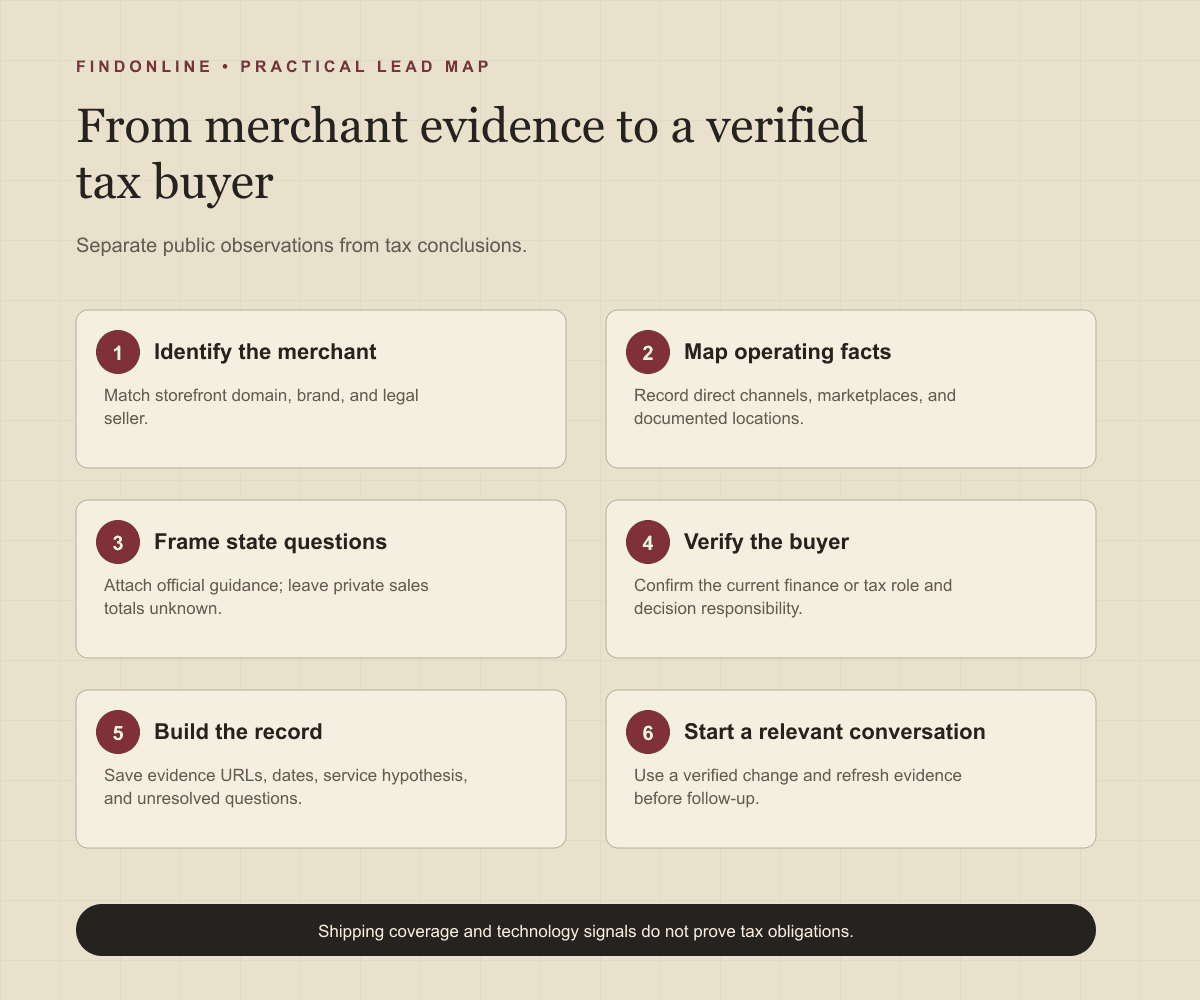
Follow this sequence:
- Choose a merchant segment your firm can serve, such as physical-goods brands selling directly and through marketplaces.
- Collect candidate domains and remove duplicate regional sites or inactive shops.
- Verify channels and operating identity on first-party pages.
- Attach relevant state guidance without labeling the merchant above a threshold.
- Verify the buyer and write one service-fit hypothesis.
- Release only records with traceable evidence and a clear next question.
Best tools to automate outreach: which options fit this workflow?
Choose tools according to the bottleneck: merchant discovery, buyer identification, enrichment, or campaign execution. The evaluations below distinguish documented capabilities from unconfirmed dimensions.
FindOnline
What it does: FindOnline combines public-signal prospect discovery with automated LinkedIn, Reddit, and email outreach. Apply it to verified merchant events and relevant finance contacts. FindOnline overview FindOnline workflow
Strengths: It supports end-to-end engagement, including contacting prospects and tracking professional events, with optional stage-level review controls. FindOnline workflow FindOnline review controls
Limitations: It is designed as a complete go-to-market (GTM) system rather than a standalone signal-monitoring or enrichment utility. If you need only one component, contact the FindOnline team to discuss a suitable configuration. Specific external integrations are not confirmed in the cited official material. FindOnline overview
Best for: Accounting firm owners connecting merchant-change research to ongoing multichannel conversations, with automation or selected approval stages. FindOnline review controls
Store Leads
What it does: Finds store domains through combined filters, including platform and app conditions. Store Leads search documentation
Strengths: Positive and negative conditions help define a merchant segment before researching people. Store Leads search documentation
Limitations: Domain segmentation does not establish the responsible tax buyer. Outreach automation, specific integrations, and approval controls are not confirmed in the cited official material. Store Leads search documentation
Best for: Firms needing a focused Shopify merchant universe before assigning contact research. Store Leads search documentation
BuiltWith
What it does: Creates filtered variations of an existing website report. BuiltWith filtering documentation
Strengths: Advanced filtering lets researchers build multiple segments from the same starting report. BuiltWith filtering documentation
Limitations: Technology observations cannot establish transaction-level tax configuration. Outreach automation, specific integrations, and approval controls are not confirmed in the cited official material. BuiltWith filtering documentation
Best for: Advisers segmenting merchants by commerce stack before proposing systems-related tax work. BuiltWith filtering documentation
LinkedIn Sales Navigator
What it does: Narrows professional searches by company, role, and seniority. LinkedIn filter documentation
Strengths: Saved searches and alerts support repeat buyer discovery. LinkedIn filter documentation
Limitations: Professional-role filters do not identify responsibility for a particular tax engagement. Automated outreach, specific integrations, and approval controls are not confirmed in the cited official material. LinkedIn filter documentation
Best for: Firms with verified merchant accounts that still need a named controller or tax leader. LinkedIn filter documentation
Apollo
What it does: Supports sequence steps across email, calls, and networking platforms. Apollo engagement documentation
Strengths: Context-aware drafting helps personalize follow-ups; Salesforce and HubSpot synchronization connects engagement records. Apollo engagement documentation
Limitations: The prioritized daily action queue is marked coming soon as of September 23, 2026; do not make it a campaign dependency. Approval controls are not confirmed in the cited official material. Apollo engagement documentation
Best for: Firms with qualified merchant contacts that need coordinated email and call follow-up. Apollo engagement documentation
Clay
What it does: Enriches contact and company data and synchronizes results to customer relationship management (CRM) systems. Clay enrichment documentation
Strengths: Its documented destinations include Salesforce, HubSpot, and Snowflake. Clay enrichment documentation
Limitations: Enrichment still requires your firm to define its tax-service qualification logic. Channel-specific outreach and approval controls are not confirmed in the cited official material. Clay enrichment documentation
Best for: Firms maintaining merchant research fields across an existing CRM workflow. Clay enrichment documentation
Tool comparison: how do the six options differ?
Use this table to match the tool to the work you need done. “Unconfirmed” means not confirmed in the cited official material, not necessarily unavailable.
| tool | best for | data and discovery | outreach automation | integrations | support and review | limitations |
|---|---|---|---|---|---|---|
| FindOnline | Merchant signals to conversations | Merchant public signals | Automated end-to-end LinkedIn, Reddit, and email | Unconfirmed | Optional stage-level review | Complete GTM system; discuss isolated needs with team. Overview Review Workflow |
| Store Leads | Merchant universe | Store filters | Unconfirmed | Unconfirmed | Search documentation; approvals unconfirmed | Buyer ownership needs separate research. Source |
| BuiltWith | Commerce-stack segments | Filtered report variations | Unconfirmed | Unconfirmed | Filtering documentation; approvals unconfirmed | No transaction-level configuration proof. Source |
| LinkedIn Sales Navigator | Named finance contacts | Role filters; alerts | Unconfirmed | Unconfirmed | Filter guidance; approvals unconfirmed | Title does not establish engagement ownership. Source |
| Apollo | Qualified-contact follow-up | Contact and account context | Automated sequences; email and call steps | Salesforce, HubSpot | Approval controls unconfirmed | Prioritized daily action queue marked coming soon. Source |
| Clay | CRM data preparation | Contact and company enrichment | Channel scope unconfirmed | Salesforce, HubSpot, Snowflake | Documentation; approvals unconfirmed | Tax qualification logic remains your responsibility. Source |
Outreach workflow: how should you turn research into conversations?
Lead with a verified business change and a narrow question. Avoid diagnosing tax problems from public information.
For a hypothetical merchant that announces a new fulfillment arrangement, write:
Your announcement describes [verified change]. Who owns reviewing state sales-tax processes as fulfillment changes? Our firm helps ecommerce teams assess [relevant service]. Would a brief scoping conversation be useful?
Offer the next step that matches your actual service: nexus assessment, channel reconciliation, registration planning, or filing-process review. Record whether the reply confirms a need, redirects you, or rules out the opportunity.
For FindOnline outreach, a credible warm introduction is one possible route. Without one, use only verified professional commonality, such as an actual shared industry or community; never invent familiarity. If neither route exists, use the direct signal-led message. This fits the FindOnline discovery-to-engagement workflow and the accounting-firm prospecting use case.
Industry-specific nuances: what changes the qualification decision?
Separate direct sales, marketplace sales, physical footprint, and service scope before prioritizing a merchant.
Texas guidance distinguishes remote sellers, marketplace sellers, and marketplace providers, with different responsibilities. It also explains that marketplace sales enter the remote-seller safe-harbor calculation even when the provider collects tax. Do not equate marketplace collection with the absence of advisory work. Guidance checked September 23, 2026. Texas remote-seller guidance
Use three practical decision rules:
- New channel: ask who reconciles direct and marketplace reporting before proposing filing support.
- New fulfillment arrangement: establish whose inventory is stored where before scoping a nexus assessment.
- New finance hire: ask whether the role will internalize tax work or coordinate specialists; hiring alone does not establish outsourcing demand.
Treat shipping destinations as coverage, not revenue. Treat a stockist address as a question about relationships, not proof of merchant-owned premises. Match the eventual engagement to records and responsibilities the buyer confirms.
Limitations: what can public signals actually establish?
Signals are directional rather than guaranteed truth. Use them to prioritize and personalize outreach and follow-ups, verify the underlying change, and rescan regularly because departments, roles, and company conditions change.
Public research should leave state sales totals, existing registrations, adviser satisfaction, and filing quality unknown unless reliable evidence establishes them. Keep observation, inference, and buyer confirmation in separate fields. A strong record earns a relevant conversation; it does not establish a tax conclusion.
Frequently asked questions: what should accounting firms clarify first?
Does nationwide shipping prove economic nexus?
No, nationwide shipping alone does not establish economic nexus. New York's guidance evaluates actual receipts and transactions over its lookback period, so a shipping policy cannot establish whether those conditions are met. New York nexus guidance
Should I contact the founder or the controller?
Contact the person with confirmed responsibility for the proposed work. Start with the founder when finance ownership is unclear, then ask who manages sales-tax operations and adviser selection.
Are marketplace-only sellers automatically unsuitable?
No, channel mix should shape qualification rather than automatically exclude a merchant. Ask about direct sales, recordkeeping, and the specific assistance sought; Texas distinguishes seller categories and their responsibilities. Texas remote-seller guidance
What if the merchant already uses tax software?
Ask which process, if any, needs advisory help. Software presence alone does not tell you whether the buyer wants reconciliation support, a scope review, or no outside assistance.
How often should I refresh the list?
Recheck evidence before a new campaign and after a material company change. Set a recurring review cadence your team can maintain, and remove stale contacts or unsupported triggers before follow-up.
Sources
- Store Locator — Allbirds · Accessed
- Registration requirement for businesses with no physical presence in New York State — New York State Department of Taxation and Finance · Accessed
- Remote Sellers and Marketplace Frequently Asked Questions — Texas Comptroller of Public Accounts · Accessed
- Sales Navigator Advanced Search Filters — LinkedIn · Accessed
- Advanced Search — Store Leads · Accessed
- Creating a Multi-Filter Report — BuiltWith · Accessed
- Sales Engagement Software — Apollo · Accessed
- Data Enrichment — Clay · Accessed
- FindOnline GTM Agents — FindOnline · Accessed
- About FindOnline — FindOnline · Accessed
- How FindOnline Works — FindOnline · Accessed