Buyer discovery
How Accounting Firms Can Find CFOs and Finance Leaders
Learn how accounting firms can find CFOs and finance leaders, verify timely opportunities, and automate relevant multichannel outreach.
By Vaishnav Gupta11 min read

On this page
Quick answer: To find finance decision-makers for an accounting firm, choose one service and company stage, identify two to four likely buyers, and verify a current finance trigger. Then use the strongest honest route: a credible introduction, verified professional common ground, or a direct signal-led message. FindOnline can automate the full workflow from research and qualification through LinkedIn, Reddit and email outreach, reply handling and ongoing engagement; review can be added only where your team wants it.
Who to target at each company
The right buyer changes with company size and finance maturity. Seniority alone does not prove ownership.
| Company situation | Start with | Also include |
|---|---|---|
| Founder-led with no finance head | Founder, CEO or COO | Head of Operations |
| Building its first finance team | Controller or Head/VP Finance | Founder or COO |
| Established finance department | CFO or VP Finance | Controller or Chief Accounting Officer |
| Large or multi-entity group | Divisional CFO or Chief Accounting Officer | Transformation or finance-systems leader |
For venture-backed software companies, a Head or VP of Finance often arrives before a CFO. Bessemer's finance-team guide places that earlier hire around Series A or B and shows that finance complexity can emerge before a full CFO role exists (Bessemer's finance-team guide). Treat those figures as SaaS context, not a universal revenue rule.
When ownership is unclear, keep two to four relevant people on the account. Rank them as owner, influencer or possible referrer, and coordinate contact at account level instead of messaging everyone at once.
Lead sources that reveal role, need and context
Use each source to answer a different question:
- LinkedIn Sales Navigator: Who holds the likely finance role, what has changed at the company, and is there a first-degree, second-degree or TeamLink path? LinkedIn documents account, lead, activity and relationship filters in its Advanced Search Filters guide.
- Company website and careers page: Does the company describe the executive's responsibility or advertise finance work connected to your service?
- SEC EDGAR: Has a public company disclosed an acquisition, reporting change or other dated event? EDGAR provides public filing APIs without an API key (SEC EDGAR APIs).
- CRM and public professional context: Does someone genuinely know the prospect? If not, do public profiles show a real shared industry, role, education, professional community or interest that can support a relevant opening?
A source is evidence, not proof of buying intent. Save the underlying URL and date. Never manufacture familiarity or imply that a shared fact is a relationship.
Lead database your team can act on
Do not stop at names and email addresses. Create one account record that tells the system why to act and how to start the conversation.
| Field | Example | Keep rule |
|---|---|---|
| Company | Northstar Logistics | Fits the chosen industry and geography |
| Verified trigger | Hiring two finance roles; source and date saved | Connects to your service |
| Likely need | Multi-entity close support | Based on evidence, not assumption |
| Stakeholders | CFO, Controller and founder | Current roles verified |
| Relationship route | No introducer; Controller follows the same supply-chain finance community | Evidence saved; never inferred |
| Message angle | Close controls during expansion | Specific to the role and trigger |
| Next action | Start with the Controller on LinkedIn | Has an owner, channel and stop rule |
Best tools to automate outreach
FindOnline - end-to-end prospecting and engagement
What it does: FindOnline discovers and qualifies prospects from public signals, chooses an evidence-backed outreach route, runs LinkedIn, Reddit and email activity, handles replies and keeps relevant relationships active after the first campaign. Its accounting-firm workflow and end-to-end GTM process connect discovery with continued engagement.
Strengths: It operates the complete workflow rather than stopping at a contact export. A credible referral can be used when one exists; otherwise the system can use verified professional common ground or a direct signal-led message. Each stage can run automatically or be held for optional review.
Limitations: FindOnline is designed as a complete GTM system, not a standalone signal-monitoring or enrichment tool. If your team needs only one component-such as signals or enrichment-contact the FindOnline team to discuss a suitable custom configuration.
Best for: Accounting firms that want prospect research, qualification, personalized outreach, reply handling and long-term engagement to run as one system. See how FindOnline coordinates the workflow.
LinkedIn Sales Navigator - professional and relationship research
What it does: Sales Navigator helps users narrow accounts and leads by company, function, seniority, activity and relationship information. Its Relationship Explorer can surface shared connections and possible internal allies (LinkedIn Relationship Explorer).
Strengths: Strong LinkedIn role context, saved searches and relationship visibility.
Limitations: A title does not prove responsibility, and a shared connection does not prove that the person can or will introduce you. Email enrichment, Reddit research, reply handling and cross-channel engagement may require other tools.
Best for: Teams that want to perform hands-on LinkedIn research and already have people or systems responsible for verification and follow-up.
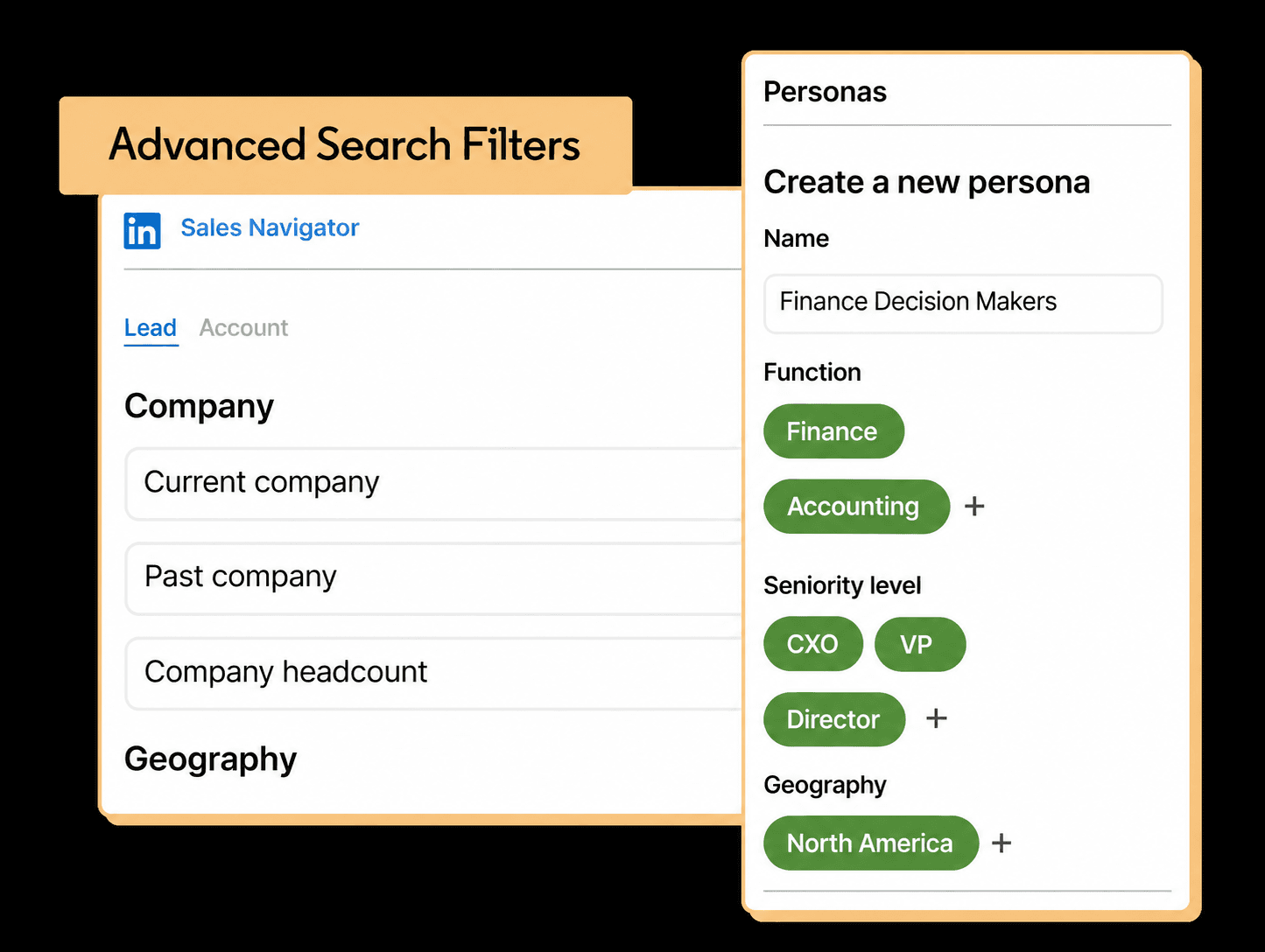
Finance-specific adaptation of LinkedIn's official Advanced Search Filters illustration. The interface may change; verify the current product before following the filters.
Apollo - contact data and repeatable sequences
What it does: Apollo combines contact research with sequences containing automated email and manual call, email or social tasks (Apollo Sequences overview).
Strengths: Useful when the target segment and outbound process are already defined and the team needs repeatable execution.
Limitations: Apollo provides contact data and sequence execution; it does not by itself confirm that a company needs accounting support, that the selected person owns the decision, or that a personalization claim is accurate. Those qualification rules must be supplied by the team.
Best for: Firms with a clear ICP and messaging playbook that primarily need contact enrichment and sequence delivery.
Clay - configurable enrichment and sequencing
What it does: Clay supports configurable research, enrichment and personalized email workflows through its tables and Sequencer (Clay Sequencer guide).
Strengths: Flexible logic for teams that want to combine several data sources and define their own qualification rules.
Limitations: Someone must design, test and maintain the workflow. The team must define how relationship evidence, commonality and accounting-specific triggers are validated.
Best for: Technical GTM or revenue-operations teams that want control over enrichment logic and can maintain the system.
Tool comparison
| Tool | Best for | Data and discovery | Outreach automation | Integrations | Support and review | Limitations |
|---|---|---|---|---|---|---|
| FindOnline | Complete prospect-to-relationship execution | Public signals across LinkedIn, Reddit and the web | Automated LinkedIn, Reddit and email outreach, replies and ongoing engagement | Coordinated campaign workflow | Fully automated or optional review by stage | Needs a precise ICP and verifiable public context |
| Sales Navigator | Hands-on LinkedIn prospect research | LinkedIn company, role, activity and relationship filters | LinkedIn prospecting; other steps may need separate tools | LinkedIn and edition-dependent CRM features | User verifies fit and relationship strength | Does not prove need or connector willingness |
| Apollo | Contact enrichment and defined outbound sequences | Contact and company database | Automated email plus manual task steps | Mailbox and sales workflows | Team owns message and compliance review | Contact data does not validate accounting need |
| Clay | Custom enrichment workflows | Configurable data inputs and qualification logic | Personalized email and event-driven workflows | Tables, providers, webhooks and CRM workflows | Team designs its preferred controls | Higher setup and maintenance burden |
Choose by the work you need done. Sales Navigator is strongest for hands-on LinkedIn research, Apollo for contact-plus-sequence execution, and Clay for configurable enrichment. FindOnline fits when the accounting firm wants the entire process-from signal discovery to sustained relationship activity-to run in one automated system.
Outreach workflow from search to reply
- Define one offer and segment. Example: outsourced controllership for multi-entity logistics companies.
- Search accounts first. Filter by industry, geography, headcount and relevant company activity.
- Map the buying group. Add CFO, VP Finance, Controller, Chief Accounting Officer and founder only where each role is plausible.
- Verify one dated trigger. Keep the source URL, date and connection to your service.
- Select the relationship route. Use a credible introducer when available. Otherwise, look for verified common ground in industry, role, education, professional communities, interests or public activity. If neither exists, lead directly with the business trigger.
- Run coordinated outreach. Let the system choose LinkedIn, Reddit or email, sequence stakeholders without collisions, and stop account outreach when someone replies. Turn on review only for stages your team wants to inspect.
- Continue the relationship. Track relevant professional changes and engage with useful posts after the campaign instead of treating the connection as closed.
Warm route:
Hi Maya - we help multi-entity logistics companies improve close and reporting. Do you know Jordan well enough to judge whether this is relevant? If so, would you be comfortable introducing us?
Verified-commonality route:
Hi Jordan - I saw your comment in the Supply Chain Finance community about close delays after expansion. We help multi-entity logistics teams improve close controls. Would a short checklist for that transition be useful?
Direct signal-led route:
Hi Jordan - I saw that Northstar is adding two finance roles while expanding locations. We help multi-entity teams strengthen close and reporting during growth. Would a short controls checklist be useful?
Use only common ground visible in a saved source. Change the business angle by role: risk and visibility for the CFO, operating workload for the Controller, and missing finance capability for the founder.
Industry-specific nuances: match the accounting service to the trigger
“Growing company” is too broad. The useful nuance is the connection between the firm's service line, the company's operating change and the finance leader who owns the work.
| Accounting service | Stronger public trigger | Likely first roles | Useful outreach angle |
|---|---|---|---|
| Outsourced accounting or controllership | First finance hires, new locations or new entities | Controller, Head of Finance, founder | Close workload and management reporting |
| Audit readiness or controls support | Funding preparation, auditor change or disclosed control work | CFO, Chief Accounting Officer, Controller | Evidence, controls and readiness milestones |
| Multi-entity tax and compliance | Acquisition, interstate expansion or new subsidiaries | VP Finance, Tax Director, Controller | Entity coordination and filing complexity |
| Finance transformation | ERP hiring, systems migration or rapid finance-team expansion | Finance transformation lead, Controller, CFO | Process ownership and implementation capacity |
A company may already have an accounting provider. The trigger should explain why the existing setup might need additional capacity or specialist help; it should not be used to claim that the current provider has failed.
Limitations: how to use signals correctly
Signals are directional, not guaranteed truth. A finance job post, funding event, filing or leadership change may be outdated, misclassified or unrelated to an active project. Use signals to prioritize accounts and personalize outreach and follow-ups-not to claim that a company definitely has a problem or budget.
Rescan signals at regular intervals because roles, priorities and business conditions change; refresh the outreach angle when new evidence appears and expire stale signals instead of repeating an old claim.
A signal should improve timing and relevance, not replace qualification. The sender also remains responsible for email compliance when outreach is automated (FTC CAN-SPAM guide).
Frequently asked questions
Should accounting firms search only for CFOs?
No. Include Controllers, Heads or VPs of Finance, Chief Accounting Officers and founders according to company maturity. The person closest to the work may be a better first contact than the most senior title.
How many finance stakeholders should be added per company?
Usually two to four when ownership is unclear. Rank each person's likely role, coordinate contact at account level and stop the sequence as soon as anyone responds.
Which signals suggest that accounting support may be relevant?
Match the signal to the service: new entities for multi-entity accounting, an auditor change for readiness work, interstate expansion for compliance, or ERP hiring for transformation support. The signal starts research; it does not prove demand.
What if there is no warm introduction?
Look for verified professional common ground such as the same industry, role, education, community, interest or a relevant public discussion. If no meaningful commonality exists, use a direct message based on the verified company trigger; never invent a connection.
Can FindOnline run without human review?
Yes. Research, qualification, multi-channel outreach, reply handling and ongoing engagement can run automatically. A team can optionally hold selected stages for review when its own policy or workflow calls for it.
Can LinkedIn Sales Navigator automate the complete workflow?
It supports account, lead and relationship discovery, but the full process also needs evidence verification, cross-channel messaging, reply handling and ongoing engagement. Those steps require the team's process or another system.
Sources
- FindOnline for accounting firms — FindOnline · Accessed
- How FindOnline works — FindOnline · Accessed
- LinkedIn Sales Navigator Advanced Search Filters — LinkedIn · Accessed
- Relationship Explorer in Sales Navigator FAQ — LinkedIn · Accessed
- How to hire a CFO and build a finance team — Bessemer Venture Partners · Accessed
- EDGAR Application Programming Interfaces — U.S. Securities and Exchange Commission · Accessed
- Sequences Overview — Apollo · Accessed
- Getting started with Sequencer — Clay · Accessed
- CAN-SPAM Act: A Compliance Guide for Business — Federal Trade Commission · Accessed